Showing posts with label Technical. Show all posts

Tuesday, May 24, 2022

Comment Issue Fixed...Maybe?

 A couple people have mentioned having trouble leaving comments on my blog.  I assumed it was a Blogger bug or a Google glitch, or possibly a browser issue.  However, I've now made some changes to my Blogger comment settings and it seems that it may have fixed the issue.  Maybe.

Here's what was happening when a friend tried to comment and what I did in response. 

My friend said when she tried to comment, she got a prompt to sign in to Google to comment.  When she signed in, it just reloaded the page, but it still didn't allow her to comment.  It was just a loop.

My Blogger settings had been set to allow all comments, including anonymous and by name/URL, but she wasn't seeing those options, just the Google sign-in prompt, which seemed to be a dead end.

I did some searching online for answers, and one of the links I explored suggested changing my comment settings from embedded to pop-up window.  I was skeptical that this would help, but when other efforts failed, I thought I'd make the suggested change to pop-up window comments and see. This means when you click to comment, it opens a separate comment window for doing that.  That's also where you'll see other comments that have been left. 


My friend was finally able to comment, so it seems to have worked.  When I checked to see how this looked in practice after making the switch, lo and behold, there were the three options for commenting, i.e. with your Google account, anonymously, or with name/URL.  I couldn't see those choices before in the embedded comment section, even though I had set them to that in my Blogger settings.  Now, within the pop-up comment window, you should see these options and be able to select one when commenting.

One downside will be that I won't be able to reply to any anonymous comments via email, unless you choose to leave your email address in your comment.  We'll just have to see how it goes and make further adjustments as necessary. 

I don't know who else may have had issues trying to comment, but if you have in the past, would you try again on this post?  Tell me what you had for dinner (I had leftover casserole) or your pet's name.  If your comment still doesn't show up, feel free to email me (thewayisewit at gmail.com) and let me know.  Thanks!

~Paulette

Wednesday, June 16, 2021

A Little Housekeeping on the Blog

As you may have read elsewhere, some of us bloggers are having to migrate our email subscriptions to a different platform if we formerly relied on Feedburner to do the job.  As of July 1, Google's Feedburner will no longer work for email subscriptions.  They are shutting that part of the service down.

That has left many of us scrambling for alternatives to handle sending our blog posts via email.  For me, it boiled down to two options that were free.  One of those options seemed a little easier to set up, and that was the service known as follow.it.

The important thing for you to know is:

  • If you were receiving my blog posts by email previously, you will continue to get them by email from follow.it.  There's nothing you need to do.  The email may look a little different, but the content will contain the entire blog post, as in the past.

  • If you have not previously signed up to get the blog by email, you can do that now!  Just enter your email address on the right sidebar near the top.  Be sure to confirm, if you're asked to do so, to make sure you start getting the posts.

Of course, you're always able to add this blog to your favorite feed reader, if that's how you prefer to keep up.  If you've already been reading the blog with a feed reader, such as Bloglovin' or Feedly, for instance, nothing will change.

I do want to point out a couple things about the emails from follow.it.  Because I chose their basic free plan, I have less options for controlling the look and functionality of the emails.  For instance, there may be links that follow.it adds to the bottom of each email.  These have NOTHING to do with my blog and I have no control over them.  I'm trying to think of a nice way of describing them, but I can't, so I'll just say it:  To me, it looks like click bait.  If you like that kind of thing, click away.  My suggestion is that you simply ignore those links.  That's what I'd do.

To that end, you will note that I've now added my signature at the end of my posts.  If you're reading the post via email, when you see the signature, you'll know you've reached the end of my content. 

If you wish to view the blog post directly from the email, or if you wish to comment (and I love comments!), click the "Continue Reading" link directly below my signature in the email.  That'll take you directly to the blog.

Note that if you hit "Reply" to the email from follow.it, your reply will not reach me.  It goes to nowhere land.  Your best bet is to click through to the blog and comment there.  Or email me directly at thewayisewit at gmail dot com.  Again, I do not receive direct replies from the blog emails.  If I would upgrade to a premium plan, I could control that and other things; but since I make no income from blogging, the free basic plan is the best option for me at the moment. 

* * * * *

And now I'll leave you with a little quilty goodness.  I went to a local quilt show last week and saw some gorgeous log cabin quilts!  Here are some of them. 


Thanks for hanging in there and reading!  Feel free to ask any questions or leave any comments.


Thursday, July 6, 2017

Inspector Gadget

Guys and gals, I've been dropped.  At least my blog has been, from my own Feedly reader feed.  The nerve!

I have been investigating, but turning up very few clues as to why.  I unfollowed my blog, then added it back.  Still can't see the latest post.  It shows up as a blog I follow, but isn't updated by Feedly to current.  I tried adding it to the "Favorites" list within Feedly, and it appeared (and current) for a brief few minutes, then disappeared again!
Then I started to wonder about all the many quilt (and other) blogs I follow.  Could it be that I have not been seeing their updates in Feedly either?  So I started looking closer, and although Feedly was telling me some hadn't updated in months, if I clicked through to the blog itself, they were, in fact, staying current.  Curiouser and curiouser.

I began to wonder how many people might be having the same issue with Feedly, and may assume I dropped out of the blogosphere?

I learned that the free version of Feedly (which is what I use) is now limiting new users to 100 blogs.  Any more than that and you have to pay a monthly fee to upgrade to unlimited.  Free Feedly didn't used to be limited, and I've followed hundreds of blogs (not that I get around to reading them all).  But I wonder if some internal metric now determines which of those I get to see in the Feedly reader free version?  

I hadn't updated my own blog in over 30 days.  Perhaps 30 days is a metric by which the blog "falls off"?  In the meantime, however, I've added blogs without an issue, and I'm seeing those people's posts in Feedly; hence, I conclude they're not truly limiting me from adding new ones above the 100 mark (perhaps I'm grandfathered in?).  But maybe, instead, the less active blogs (mine included) are falling off the radar (or reader) and not showing up as having posted anything new?


Many questions, a few hunches, but no definitive answers that I've found thus far.  Guess I'll see if this post all of a sudden shows up in my Feedly feed like nothing ever happened.  Maybe the previous post exceeded some parameter (like overall size...there were a lot of pictures in the last post).  I'll let you know.  (Edited to add:  Okay, so I see this post in Feedly...that's good, but it's still weird about the previous post.  I still have questions.)

In the process of investigating and looking into options, I've started to get reacquainted with Bloglovin'.  I'm still not thrilled with it—the layout seems a bit overwhelming and less informative to me, for starters—but at least I seem to be seeing in Bloglovin' all the blogs I follow.  Things have changed since I last used it on a regular basis, and it'll take some time to get used to again.  Also, I'm having to sort through the blogs I had been following in Feedly and add them to Bloglovin'.  Good thing it's been a holiday week with available down time, ha.

In going through the Feedly blog listing one by one—wow, a lot of people I used to follow have stopped blogging.  Maybe they are connecting on a different platform (Instagram, etc.).  But I miss you guys!  It's sad to realize the extent of the exodus, and it feels like losing friends, even though most of us have never met in real life.

Has hobby blogging become a thing of the past, do you think?  I don't know, there seems to be a different vibe than just a couple short years ago.  Not sure whether readership has increased or decreased, but it seems like people commented more.  Myself included.  Just an observation.  Speaking personally, it seems sometimes like things reach a level when you just can't possibly keep up (maybe after 100 blogs? he-he), so you give up trying and just pop in here or there with a comment when you can.  Yet reading and somewhat keeping track of where people are in their lives, feels like a true connection, even if you don't engage or comment, so when those people go away, there's that pang of loss.  Still, I totally get that there are various reasons people move on, and I wish them all the best.  It may well be that I decide to do the same someday.

Anyway, back to the story.  Along the way, I decided to subscribe to my own email list.  Why I had never done that before, I don't know.  Come to find out that in the last post, the email version doesn't have the YouTube videos embedded.  Just dead space where there was something to see in the actual post.  Good to know.  I'll keep that in mind for the future.  Also, I'm not sure I like the look of the email version, but that seems beyond my grasp of how to fix at this point.

(By the way, the music in the last post under "Listening" was by Jason Isbell, and "Watching" was the Netflix series GLOW.  Maybe in the future, I'll just link versus embed stuff like that.)

Here's a question about Bloglovin':  I've been getting periodic email notifications that read, "Bloglover is now following your blog."  After about the third or fourth identical notification, I assumed this was a tactic Bloglovin' used to get users to log in after a period of time and use the site.  A kind of solicitation, like the emails Pinterest sends to get you to click over.  But I see now, in looking at my Bloglovin' followers, that there are indeed numerous "Bloglovers."  Hence, I wonder if this is how it appears if someone follows you anonymously, i.e. the generic name "Bloglover"?

I probably sound really green about this stuff, and I apologize for the technical nature of this post.  Maybe your experiences can help this dog learn some new tricks.  Do you have any insights or observations to share on the subject of your favorite feed reader?  Or on blog reading and/or commenting in general?  Do you follow your own blog to stay on top of technical issues and/or see it from a different perspective?  Do share.

Monday, June 3, 2013

Housekeeping

I'm doing a little housekeeping around the blog.  I guess I'm supposed to do this claiming thing for Bloglovin'.  Here goes.

Follow my blog with Bloglovin 

I also added "Follow me with Bloglovin'" button on the right sidebar, as well as a Pinterest icon. 

Across the top of the page, I have started to add some tabs, "About" and "Tutorials," for now.  I will add one or more for other things later, such as quilts and flimsies.

You have no idea how long all this tech fussing took me today.  Good thing I didn't have to work until this evening, is all I'm sayin'.

I've been using Feedly some, and now I will try and compare the Bloglovin' reader, but in all honesty, I'm know I'm going to miss the heck out of Google Reader.  I'll be hanging on until the bitter end with GR.

Also a heads up that I'm going to start banging up a tutorial for the Four-Lily Block this week, as promised in my Blogger's Quilt Festival post.  I hope you'll join me for that.  Sharpen your pencils!

Thursday, March 14, 2013

Really Random Thursday 3-14-13


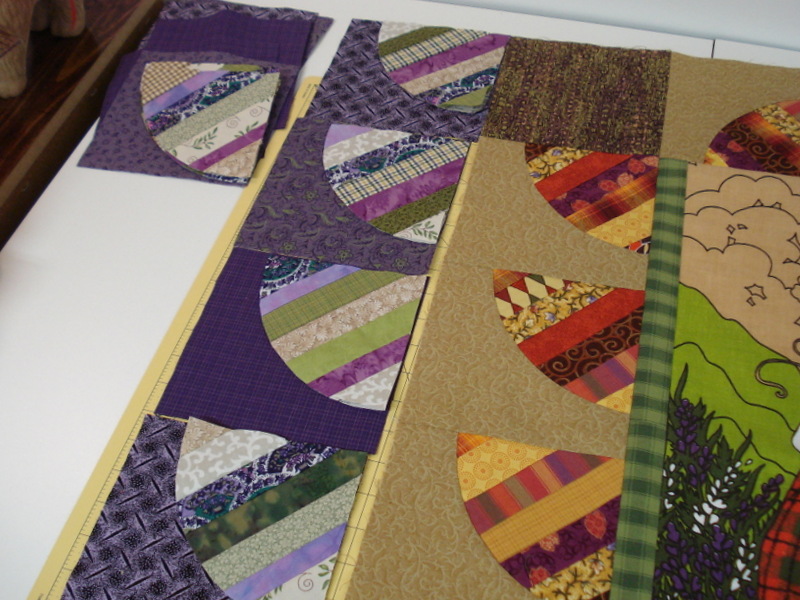
I seem to have spent a week in neutral as far as sewing goes, except for a bit of work on the Tea Towel Challenge.  I made some more drunkard's path string blocks (actually only the string parts thereof).  

The idea was to make the next border with mostly cooler colors, greens, purples, etc., but I am not sure how that is going to look.  Will there actually be a second border like that, or will I end up taking apart what I have sewn so far and mixing things around? 

Time will tell, I guess.  For now, I'm forging ahead with the DPs.  We'll see where it goes from here.

* * * * *
I recently watched the 2009 Masterpiece Classics version of Wuthering Heights.  How did I miss this before?  I do love me a romantic costume drama.  Anyway, thank you Netflix for the recommendation.

Tom Hardy stars as the tormented Heathcliff and...swoon...is about all I have to say about that.  Oh, and lips.  Holy cow.

I had seen Tom Hardy in Lawless and Inception ("You mustn't be afraid to dream a little bigger, darling" Best line ever!).  

I have Warrior in the Netflix queue next.  I'm appreciating his fine acting ability; he's quite mesmerizing to watch!  ;)

* * * * *
Now for some tech talk. 

I recently added a gadget for emailing blog posts to those who wish to subscribe, and this service is managed by Feedburner.  (See the right-hand column of the blog page.)

It works pretty slick, from what I gather from friends who are using it.  However, when my dad asked if I'd gotten his reply email to a recent post he received by email through Feedburner, I had not. And thus it occurred to me there was a problem.  I set about troubleshooting it this morning and eventually found the fix.

So I offer this information for other bloggers who use Feedburner and may want to check the status of their reply email address.

Problem:  Reply email setting for posts emailed to subscribers (originating  from Feedburner service) is set to "No Reply."

Solution: 
- Log into Feedburner.google.com.
- Click the "Publicize Tab" at the top of the page.

- Under "Email Subscriptions" in the left-hand column,
- Click "Communications Preferences"
- Check the "Email From" Address - if it is "no reply," highlight and change to the email address where you would like to receive replies.

- Click "Save" at the bottom of the page to save changes.

Even though  my regular Blogger account has my correct reply email address, somehow it defaulted to "no reply" in Feedburner.  You would think otherwise, but apparently not.

So now, Dad, and anyone else who cares to reply directly instead of commenting on the page (which I appreciate too, of course), you can simply hit "Reply" to the email.  The reply should come directly to me.  It won't post in the comments.  If I start getting spammed, I may have to change the setting back, but I'll let you know.

Linking to Really Random Thursday at Live a Colorful Life!